
序言
面向对象编程过程中如何把类与类之间的关系表述出来,最好的方法是使用统一建模语言中的类视图。
从现实世界到业务模型再到设计模型到实现,类视图是关键的一环。
类图的基本元素
- 类
类是具有相同属性和行为对象的抽象,是面向程序设计的核心。
类由类名、属性、行为三部分组成。 - 接口
描述行为的集合。 - 关系
类图中存在六种基本关系,分别是实现、泛化、组合、聚合、关联和依赖。类图元素的关系
实现 (Realization)
表示类对接口的实现操作,类具有接口的所有行为。用带有空心三角箭头的虚线表示,箭头指向接口。如下图所示:
1 | @startuml |
泛化 (Generalization)
类或接口之间的继续,表示通用与具体的差异。用带有空心三角箭头的实线表示,箭头指向父类。如下图所示:
1 | @startuml |
组合 (Composition)
整体与部分的关系,部分不能离开整体而独立存在。整体和部分的生命周期一样,同生共死,相当伟大。用带实心的菱形的实线表示,菱形指向整体。如下图所示:
1 | @startuml |
聚合 (Aggregation)
整体与部分的关系,部分可以离开整体而独立存在。整体对部分只有使用权,整体和部分的生命周期相互独立,可以同甘共苦也可老死不相往来。用带空心的菱形的实线表示,菱形指向整体。如下图所示:1
2
3
4
5@startuml
object Company
object Employee
Company o--> Employee
@enduml
关联 (Association)
同级类之间的引用,彼此不存在包含关系,引用者知道被引用者的属性和行为。关联可以是双向的也可以是单向的,在java种关联关系一般用成员变量来实现。
用带普通箭头的实线表示,箭头指向被引用者。如下图所示:
1 | @startuml |
依赖 (Dependency)
一个类的实现依赖另外一个类的数据。
用带普通箭头的虚线表示,箭头指向被使用者。如下图所示:
1 | @startuml |
总结
- 实现: 类实现接口。
- 泛化: 类或者接口的继承。
- 组合: 结构上整体和部分不能分开,生命周期一样,由整体维护。
- 聚合: 结构上整体和部分能分开,生命周期各自维护。
- 关联: 类间存在使用和被使用的关系。
- 依赖: 一个类用到另外一个类的数据。
关系的强到弱顺序: 泛化 = 实现 > 组合 > 聚合 > 关联 > 依赖。
类视图的基础
plantuml 类语法
- 对象声明
class或object1
2
3
4@startuml
class example1
object example2
@enduml
六种基础关系
1 | @startuml |
关系上的标识
在关系之间使用标签来说明时, 使用 :后接 标签文字。
对元素的说明,你可以在每一边使用 "" 来说明1
2
3@startuml
Class01"1" *-- "many"Class11 : contains
@enduml
在标签的开始或结束位置添加< 或 >以表明是哪个对象作用到哪个对象上。1
2
3
4
5
6@startuml
class Car
Driver -right- Car : drivers >
Car *-right- Wheel : have 4 >
Car -down- Person : owns <
@enduml
添加方法
为了声明域或者方法, 可以使用后接域或者方法
系统会检查是否有括号来区分是域还是方法1
2
3
4
5
6@startuml
Object <|-- ArrayList
Object : equals()
ArrayList : Object[] elementData
ArrayList : size()
@enduml
也可以使用{} 把域或者方法括起来
注意,这种语法对于类型/名字的顺序是非常灵活的1
2
3
4
5
6
7
8
9
10@startuml
class Dummy{
String data
void methods()
}
class Flight{
fightNumber : Interger
departureTime : Date
}
@enduml
你也可以使用{field}或{method}修饰符来覆盖解析1
2
3
4
5
6@startuml
class Dummy{
{field} A field (despite parentheses)
{method} Some method
}
@enduml
定义可访问性
一旦你定义了域或者方法,你可以定义 相应条目的可访问性质。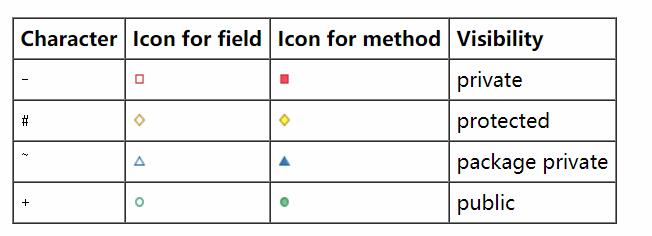
1
2
3
4
5
6
7
8
@startuml
class Dummy{
-field1
-field2
~method1()
+method2()
}
@enduml
你可以采用以下命令停用这些特性 skinparam classAttributeIconSize 0 :1
2
3
4
5
6
7
8
9@startuml
skinparam classAttributeIconSize 0
class Dummy {
-field1
#field2
~method1()
+method2()
}
@enduml
抽象与静态
通过修饰符{static}或者{abstract},可以定义静态或者抽象的方法或者属性。
这些修饰符可以写在行的开始或者结束。也可以使用{classifier}这个修饰符来代替{static}1
2
3
4
5
6@startuml
class Dummy{
{static} String id
{abstract} void method()
}
@enduml
高级类体
PlantUML默认自动将方法和属性重新分组,你可以自己定义分隔符来重排方法和属性,下面的分隔符都是可用的:--..==__。
还可以在分隔符中添加标题:
1 | @startuml |
备注和模板
模板通过类关键字(“<<“和”>>“)来定义
- 你可以使用
note left of,note right of,note top of,note bottom of这些关键字来添加备注。 - 你还可以在类的声明末尾使用
note left,note right,note top,note bottom。来添加备注 - 此外,单独使用
note这个关键字也是可以的, 使用..符号可以作为一条线链接它与它对象的虚线。1
2
3
4
5
6
7
8
9
10
11
12
13@startuml
class Object <<general>>
Object <|-- ArrayList
note top of Object : In java ,every class \n extends this one
note "This is a floating note " as N1
note "This note is connected \n to serval object ." as N2
Object .. N2
N2 .. ArrayList
class Foo
note left : On last defined class
@enduml
更多注释
可以在注释中使用部分html标签:1
2
3
4
5
6
7
8<b>
<u>
<i>
<s>, <del>, <strike>
<font color="#AAAAAA"> or <font color="colorName">
<color:#AAAAAA> or <color:colorName>
<size:nn> to change font size
<img src="file"> or <img:file>: the file must be accessible by the filesystem
你也可以在注释中展示多行
你也可以在定义的class之后直接使用 note left,note right, note top, note bottom 来定义注释。1
2
3
4
5
6
7
8
9
10
11
12
13
14
15
16
17
18@startuml
class Foo
note left: On last defined class
note top of Object
In java, <size:18>every</size> <u>class</u>
<b>extends</b>
<i>this</i> one.
end note
note as N1
This note is <u>also</u>
<b><color:royalBlue>on several</color>
<s>words</s> lines
And this is hosted by <img:sourceforge.jpg>
end note
@enduml
链接的注释
在定义链接之后,你可以用note on link给链接添加注释
在定义链接之后,你可以用note left on link,note right on link,note top on link,note bottom on link,(对应位置分别在label的左边,右边,下边)
1 | @startuml |
抽象类和接口
用关键字abstract 或abstract class来定义抽象类 。抽象类用斜体来表示 。也可以使用interface,annotation和emun 关键字。
1 | @startuml |
泛型(generics)
你可以使用<和>来定义泛型。
1 | @startuml |
使用非字母字符
如果你想在类(或者枚举)的显示中使用非字母符号,你可以:
- 在类的定义中使用
as关键字 - 在类的旁边加上
""
1 | @startuml |
待续,后面剧情更精彩,敬请期待!